Garmin Golf
GarminSports
4.71.96K Reviews
- Version
- 3.9
- Installs
- 1.00M
- Age Rating
- Everyone
Screenshots
Our Review of Garmin Golf
 Analysis by Appyee
I approach Garmin Golf as a companion for keeping golf rounds organized and making friendly competition easier, rather than as a replacement for a coach or a full lesson plan. The idea is most appealing when I already play with friends and want a simple way to compare scores, or when I use Garmin golf equipment and would like my round information in one place. It is a free sports app from Garmin, rated for Everyone, and its appeal depends less on flashy extras than on whether its scoring and social tools fit the way I actually play.
What the app is like now
The app has a 4.2 average from around 21,000 ratings, with over a million installs. That gives a prospective user a useful sense of its reach, but I would not treat popularity as proof that it suits every golfer. Someone who wants to record rounds and compete with familiar players has a clearer reason to try it than someone looking for a detailed training course or a general golf news feed.
Garmin Golf is free to install, with in-app purchases listed from $9.99 to $99.99 per item. I would check the purchase details in the app before building a routine around any paid option, and decide whether its core use is already valuable to me without one. The current version is 3.6.1, and the app first arrived on May 31, 2017. That history suggests a product with time to establish its place, but a version number by itself does not tell me exactly which features have changed or how well they work on a particular phone.
For an ordinary round, I would think of it as a digital scorecard with a social layer: it can make scores easier to keep and give a group something to compare after play. That is a different job from a dedicated swing-analysis tool. If my main goal is to diagnose a slice, plan practice drills, or get coaching feedback, I would look for a service built around instruction rather than expect a scorekeeping app to solve that problem.
How it fits a real round
A practical use is a weekend game where everyone wants to keep a shared sense of how the round is going without passing around a paper card. I would set up the social side before arriving, make sure the people I want to compare with are connected, and avoid fiddling with setup while the group is ready to tee off. That small bit of preparation matters: a golf app is only helpful during play if recording a score does not distract from the next shot or slow down the group.
Course information and distance views can also help me think through a hole, but I would treat phone-based guidance as a planning aid, not an unquestionable instruction. Conditions, lie, wind, and my own comfort with a club still matter. Before relying on any map or distance display, I would check that the selected course and hole are correct and compare the guidance with what I can see on the ground. This is especially sensible when I am playing somewhere unfamiliar or when a small discrepancy could affect club choice.
After the round, the record is more useful if I enter scores consistently. I would use the same method each time and review performance over several rounds instead of reading too much into one unusually good or bad day. A score history can give context to my progress, but it cannot explain why a number changed. If I want to learn from it, I still need to remember what happened: missed putts, a penalty, or a strong stretch of approach shots are more actionable than a total score alone.
Competition without turning every round into a contest
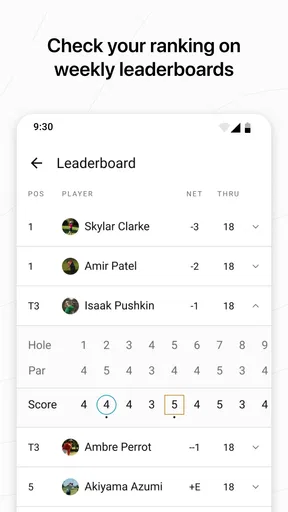
The social features are a good fit for friends who already enjoy a little rivalry. Shared scores and leaderboards can give a regular group a reason to stay engaged, and a virtual competition may help make a round feel connected even when players are not standing together. I would use those features selectively. If one person in the group dislikes comparing scores, or if the round is mainly a relaxed social outing, the competitive layer should stay optional rather than become the point of playing.
It is also worth separating friendly motivation from meaningful measurement. A leaderboard tells me how participants compare under its rules; it does not automatically tell me who is improving most or who played the hardest course. I would check the competition format before treating a result as a fair comparison. That is a small but useful habit when players have different routines, equipment, or levels of experience.
Garmin gear, phone use, and practical limits
Garmin owners have an obvious reason to consider the app: it is designed to work with the company’s golf devices, so keeping related information together may feel more natural than using separate tools. Still, I would confirm that my particular device and the features I care about work the way I expect before changing my usual routine. People without Garmin hardware can still find value in the app’s broader golf and competition role, but should not assume that every device-linked benefit applies to them.
On the course, the phone itself is part of the equation. I would start with a charged device, check that the app is ready before play, and keep score entry brief. Any app that asks for attention during a shot can become a nuisance, even if its features are useful between shots. Golfers who prefer to leave their phones in a bag may be happier with a watch, handheld device, or paper card, depending on what they already use.
First Impressions
Downloading the Garmin Golf app was a breeze. Available on both Android and iOS, it took mere minutes to install and get started. Right off the bat, the app impresses with its clean layout and intuitive interface. Everything is neatly organized, making it easy to navigate, even for those who aren't particularly tech-savvy.
Features That Stand Out
One of the standout features of the Garmin Golf app is its extensive course database. With over 41,000 courses worldwide, you're likely to find your favorite local course on the list. This means you can practice your swing anywhere, anytime, whether you're at home or traveling.
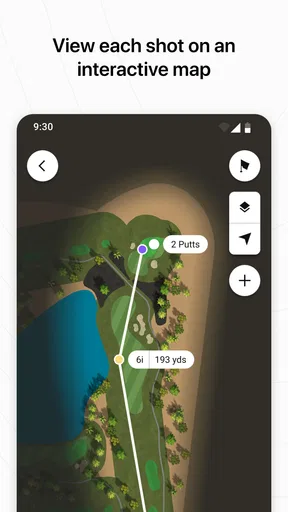
The app also offers detailed course maps, which are a game-changer. You can see each hole, plan your strategy, and even check distances. The GPS accuracy is spot-on, helping you make informed decisions on the course.
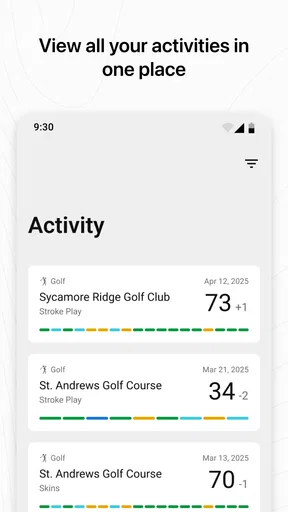
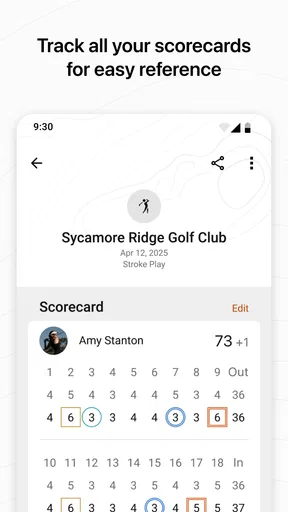
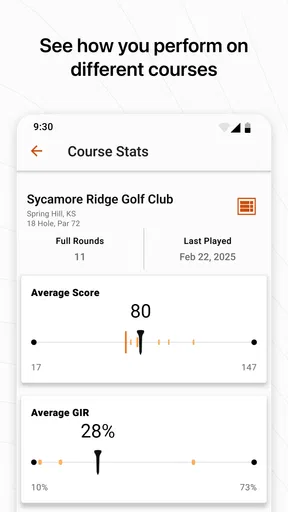
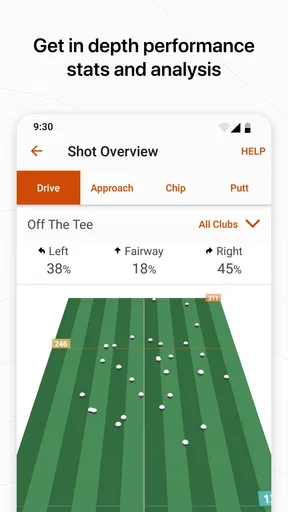
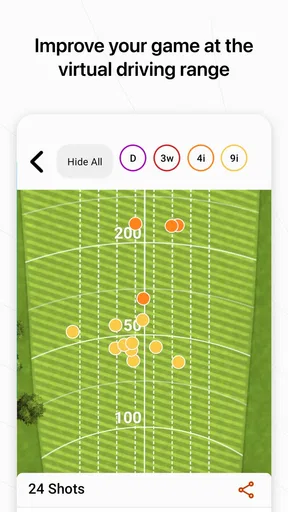
Another feature I love is the scoring system. You can easily track your scores and see your performance over time. The app provides insights and analytics, which are perfect for those who want to improve their game. It's like having a personal caddy right in your pocket!
Community and Competitions
One thing that sets the Garmin Golf app apart is its community aspect. You can connect with friends and other golfers, share your scores, and even participate in weekly leaderboards. It's a fun way to add a competitive edge to your game and see how you stack up against others.
The app also hosts virtual tournaments, which are a blast. Whether you're competing with friends or strangers from around the world, it's a great way to test your skills and maybe even win some bragging rights.
Integration and Usability
If you own a Garmin device, integration with the app is seamless. Syncing your watch or handheld device is straightforward, allowing you to access your data effortlessly. Even if you don't have a Garmin device, the app is still fully functional, offering a wealth of features that any golfer can appreciate.
Usability-wise, the app performs well. I didn't experience any lag or crashes, and updates are consistently rolled out to fix minor bugs and enhance functionality. It's clear that the developers are committed to providing a top-notch experience.
Making a fair comparison
Compared with a paper scorecard, the app’s main advantage is that scores can feed into a longer record and social competition without relying on someone to keep the card safe. Compared with a general-purpose GPS or golf scoring app, its strongest reason to choose it is the connection to Garmin’s golf ecosystem and the friend-versus-friend angle. If I only want a quick distance check, a dedicated rangefinder may be simpler; if I want coaching, a specialist lesson or swing-analysis service is a better match. I would choose according to the task I repeat most, not the longest feature list.
There are trade-offs to that convenience. A phone interface takes attention, and a score or map is only as useful as the information I enter and the course context I verify. Social competition can also make a casual round feel more formal than intended. I would keep the app as a helper: use it for scorekeeping and comparison, but let the group’s pace and the shot in front of me take priority.
Who should give it a try
I think it makes the most sense for golfers who play regularly with a familiar group, enjoy tracking rounds, or already use Garmin golf equipment. A newer player may appreciate having a consistent place to record scores, but should not expect the app alone to teach course management or improve mechanics. Someone who plays only occasionally can still use it, though the social and historical value will naturally be greater once there are rounds and connections to look back on.
I would skip it if my priority were a phone-free round, specialist coaching, or a tool whose sole purpose is measuring distance. It may also be the wrong fit if nobody I play with wants to join the social side and I do not care about comparing results. Before a first round, I would install it at home, explore the relevant screens, and sort out any device connection in advance. That avoids testing unfamiliar controls while my group is waiting.
What to watch as it develops
The current release, version 3.6.1, is the clearest snapshot of the app’s present state; its earlier release in 2017 places it in a mature product category, but neither fact proves what a future update will bring. I would watch for changes that make score entry, device syncing, and competition setup more dependable, since those are the parts most likely to affect a normal round. Until an update is actually available, I would treat improvements as possibilities rather than promises.
For existing users, the practical question is whether the app still fits their routine: whether their device connects reliably, whether their regular group uses the competition tools, and whether reviewing scores leads to a useful adjustment in practice. If those pieces work, there may be little reason to change how they play. If they do not, trying a simpler scorecard or a dedicated alternative for the specific task could be less frustrating than forcing every golf need into one app.
Final Thoughts
In conclusion, the Garmin Golf app is a must-have for anyone serious about their golf game. It combines functionality, community, and ease of use in a way that enhances the golfing experience. Whether you're a beginner or a seasoned pro, there's something here for you.
With its comprehensive features and competitive edge, the Garmin Golf app isn't just another golf app—it's a tool that can genuinely help you improve your skills and enjoy the game more. So, if you haven't already, give it a try and see how it can transform your time on the course.
Verdict
Strengths of Garmin Golf
- Detailed course maps available.
- Tracks performance metrics.
- Easy scorecard entry.
- Connects with Garmin devices.
- Community leaderboard feature.
Limitations of Garmin Golf
- Requires Garmin device for full features.
- Limited offline functionality.
- Subscription for premium features.
- Complex interface for beginners.
- Occasional syncing issues.
Other Releases by Garmin
View All
Navionics® Boating
Maps & Navigation2.9

Garmin Explore™
Maps & Navigation3.5

Garmin Drive™
Auto & Vehicles3.8

Garmin ActiveCaptain®
Maps & Navigation4.1
Similar Picks in This Category
View All
BeSoccer: Soccer Live Score
BeSoccer apps4.3

Cricbuzz - Live Cricket Scores
Cricbuzz.com3.7

NFL
NFL Enterprises LLC2.4

Da Fit
MO YOUNG LIMITED3.6

ESPN
Disney4.5

LiveScore: Live Sports Scores
LiveScore Limited4.5
Frequently Asked Questions
What features does the Garmin Golf app offer?
The Garmin Golf app provides a comprehensive suite of features designed to enhance your golfing experience. It includes detailed course maps, real-time scoring, and stat tracking. Users can also participate in weekly leaderboards and tournaments. Additionally, the app offers club performance analysis and integrates seamlessly with compatible Garmin devices.
Is the Garmin Golf app compatible with all devices?
The Garmin Golf app is compatible with both Android and iOS devices. However, to utilize its full range of features, it is recommended to use it with Garmin golf devices, such as smartwatches and rangefinders. Check your device's compatibility on the Garmin website before downloading.
Is there a cost associated with using the Garmin Golf app?
The Garmin Golf app is available for free download on both the App Store and Google Play. While many features are accessible at no cost, some advanced features may require a subscription or purchase of a compatible Garmin device. Always check for any in-app purchases or subscription fees.
Does the Garmin Golf app require an internet connection?
While the Garmin Golf app can operate offline, many of its features, such as live scoring and leaderboard updates, require an internet connection. Offline usage is possible for basic functions, but to fully utilize the app’s capabilities, a stable internet connection is ideal.
How does Garmin Golf app enhance the golfing experience?
The Garmin Golf app enhances the golfing experience by providing detailed course maps and real-time data. It allows golfers to track scores, analyze performance, and compete in virtual tournaments. The app also offers insights into club performance and swing metrics, helping golfers improve their game strategically.
